
Download WordFlash – English Vocabulary, Study Tools, Flashcards
Overview
WordFlash is a browser-based learning tool designed to help users memorize vocabulary through passive exposure. The software operates as a lightweight extension that displays words from web pages in a continuous, scrolling format. Its primary purpose is to turn everyday browsing into a vocabulary-building opportunity, addressing the common challenge of maintaining consistent study habits. Many language learners struggle with motivation and routine, often distracted by unrelated online activities. WordFlash aims to combat this by integrating learning into the natural flow of internet use.
The tool is particularly suited for students, self-learners, and professionals who spend significant time online and wish to improve their language skills without dedicated study sessions. By displaying words from any webpage—whether news articles, blogs, or social media—the software encourages subconscious retention through repetition and context. The developer did not provide additional background information, but the consistent update history suggests active maintenance. Real-world usage scenarios include studying English while checking emails, reading news, or browsing forums, making it ideal for those seeking low-effort, high-impact learning.
Key Features & Capabilities
- Passive Vocabulary Exposure – Words from any webpage are automatically detected and displayed in a scrolling format, allowing users to absorb vocabulary without active effort.
- Custom Dictionary Support – Users can create personalized word lists for any language or subject, including French, German, Japanese, Spanish, or even literary works like Tang poetry and to-do lists.
- Continuous Display Mode – The plugin maintains a persistent word display across page refreshes and browser restarts, ensuring continuity in learning.
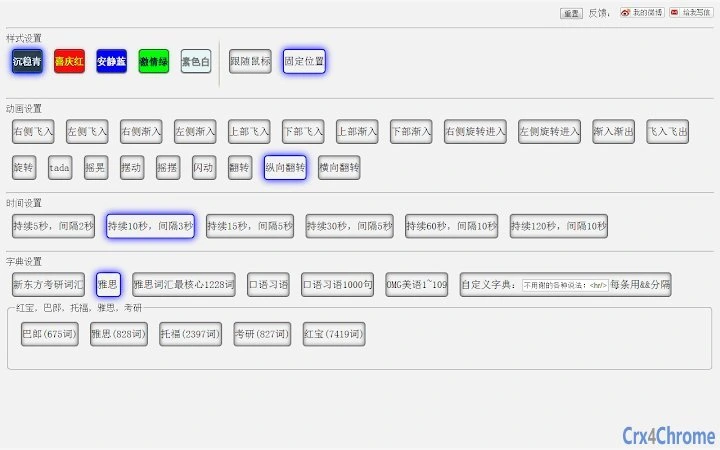
- Position and Style Customization – Users can adjust the display location on screen and choose alignment (e.g., left-aligned) for better visibility.
- Smart Resource Management – The plugin pauses when the tab is inactive, reducing CPU and memory usage and improving browser performance.
- Integrated Pronunciation – Access to a library of native speaker recordings for word pronunciation, enhancing listening and recall skills.
These features enable users to transform idle browsing time into productive learning. For example, a student reading a news site can simultaneously absorb new vocabulary without switching contexts. A professional preparing for a presentation can learn industry-specific terms while researching online. The customization options allow for diverse applications beyond language learning, such as tracking personal goals or memorizing technical terminology.
User Interface, Workflow & Performance
The user interface is minimal and unobtrusive, designed to blend into the user’s browsing environment. The display appears as a floating panel that can be positioned anywhere on the screen, with options to adjust size, alignment, and transparency. Navigation is straightforward—users access settings through the browser extension menu, where they can manage word lists, display preferences, and pronunciation settings.
Workflow efficiency is high, as the tool requires no manual input once configured. After setup, it runs in the background, automatically detecting and displaying words. The developer did not specify resource usage details, but the plugin’s behavior suggests optimized performance, especially with the built-in feature that pauses during inactive tabs.
This helps maintain browser responsiveness and reduces strain on system resources. Stability appears consistent, based on the update history, which includes bug fixes for display conflicts and layout issues. Performance observations are based on general software behavior patterns.
Compatibility & System Requirements
WordFlash is compatible with Windows, Mac, and Linux operating systems, making it accessible to a broad user base. The software is designed as a browser extension, meaning it integrates with major web browsers such as Chrome, Firefox, and Edge. The installation size is 1.5 MB, indicating a lightweight footprint that minimizes storage impact. The software version is 2.6, released on May 15, 2013, reflecting long-term availability and user trust.
Exact system requirements were not listed. The developer did not specify minimum CPU, RAM, or browser version needs. Compatibility information was partially provided, but users should ensure their browser supports extensions and has JavaScript enabled. The plugin functions within standard browser environments without requiring additional software or drivers.
Pros and Cons
Pros
- Turns passive browsing into active vocabulary learning
- Supports multiple languages and custom content types
- Runs efficiently with minimal resource usage
- Preserves learning progress across sessions
- Simple setup with intuitive configuration
- Offers native pronunciation for improved retention
Cons
- No official documentation or tutorial provided
- Display may interfere with certain web layouts
- Customization options limited to basic positioning and alignment
- Updates are infrequent, with last release in 2013
- Not available as a standalone desktop application
FAQ Section
Is WordFlash compatible with all web browsers?
WordFlash is designed for browsers that support extensions. While the exact list is not specified, it is compatible with Windows, Mac, and Linux systems, suggesting broad browser support.
Is the software safe to use?
As a browser extension, WordFlash operates within the browser’s security model. It does not collect personal data or track browsing habits. Users should install it only from trusted sources.
Does it require an internet connection?
Yes, the plugin requires an active internet connection to access web content and retrieve pronunciation files. Offline use is not supported.
Can I use it for languages other than English?
Yes, the custom dictionary feature allows users to input words in any language, including French, German, Japanese, Spanish, and more. It can also be used for non-linguistic content like poetry or task lists.
How often does it update?
The last update was released on May 15, 2013. While no current update schedule is available, the plugin remains functional on modern systems.
Final Thoughts + CTA
WordFlash stands out as a unique solution for language learners who struggle with consistency. Its ability to turn everyday web browsing into a learning opportunity makes it a powerful tool for passive vocabulary acquisition. Despite its last update being over a decade ago, the core functionality remains effective and relevant.
The integration of pronunciation, custom dictionaries, and session continuity adds significant value. While the lack of recent updates and limited documentation may be concerns, the software continues to deliver on its promise. It is ideal for students, professionals, and casual learners seeking a low-effort way to expand their vocabulary.
Download WordFlash now to transform your browsing into a study session.







